
Browse all guides
Bank
Add a bank or cash account
Add each bank account and cash box you use. Every payment in and out goes through one of them.
Before you start: Have your bank name and account number ready.
Steps
- 1Go to Cash & Bank Book › Accounts and click Create.
- 2Pick the account type: Cash, Bank Account, Clearing Account, Loan Receivable or Loan Payable. Click Next.
- 3Enter the Account Name and pick the Currency. Account Code is optional.
- 4For a bank account, pick the Bank Name, enter the Account Number and pick the Account Type: current, savings or fixed deposit.
- 5Click Save Account.
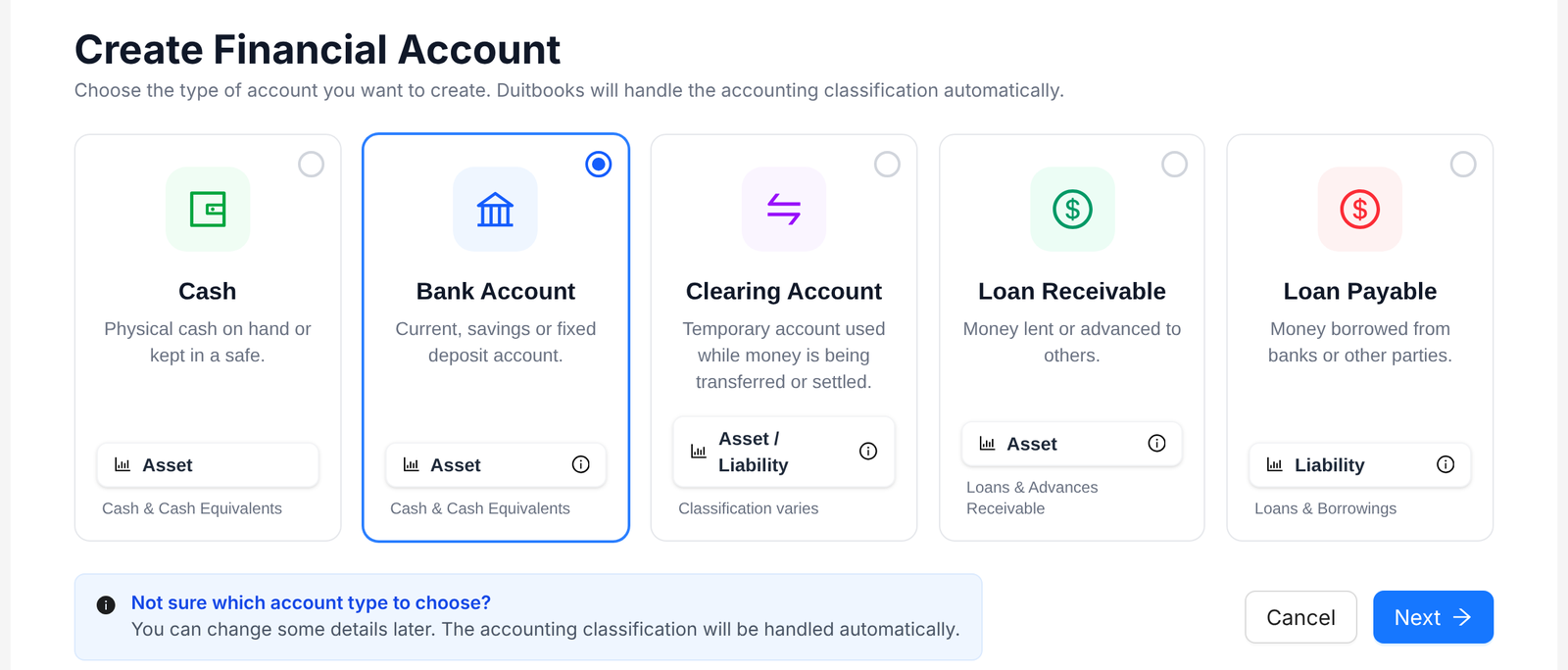
Tip: You don't need to know the accounting side. Duitbooks sorts each account into the right place in your reports.
FAQ
When do I use a clearing account?
For money that's on its way, like cheques in clearing or payment gateway settlements.
Where do I record a bank loan?
Add it as a Loan Payable account.
Can I change the details later?
You can change some details later. Open the account and edit it.
Related
Record a payment receivedWhen a customer pays, record the money in and link it to their invoices. Their balance updates for you.Reconcile your bankUpload your bank statement and match each line to what's in your books, so you know they agree.Set up your businessAdd your company details once. Duitbooks uses them on every invoice, report and e-invoice.